
First, here is the official tutorial. This blog was built by following that tutorial.
Why Astro?
Why Astro? - Astro’s official explanation of why this technology is worth choosing.
Astro is a static site generator. It can render Markdown files into HTML. There are many similar tools, such as Hexo, Hugo, and Jekyll, but Astro’s build process feels more transparent to me.
By “transparent”, I mean I can understand more clearly how the code runs. With other generators, the early process is usually to set up deployment, choose a theme, and deploy. Take Hexo as an example. As a content creator, you only need to write Markdown files and push them to a Git repository. It automatically triggers a site update, and Markdown is rendered into web pages. The advantage is that you do not need to care about the website construction process and can focus on content creation.
Astro’s build, however, is a complete front-end project.
Project structure of this blog
.
├── public
│   ├── css
│   └── images
├── src
│   ├── components
│   ├── layouts
│   ├── pages
│   ├── scripts
│   └── styles
├── astro.config.mjs
├── package.json
└── tsconfig.json
public: static assets such as images and CSS.src: source code.components: components.layouts: layouts.pages: pages.scripts: scripts.styles: styles.
astro.config.mjs: Astro configuration file.package.json: project configuration file.tsconfig.json: TypeScript configuration file.
The project structure is not very different from a normal front-end project. But a project created with Astro supports rendering Markdown into HTML and has routing built in, so no extra plugins are needed for these features.
That is what I value: it works out of the box. When Astro is used for a blog-like website, Markdown rendering saves a lot compared with ordinary front-end templates. Astro also generates routes automatically based on file locations, which makes navigation convenient.
The Astro island architecture, also called component islands, is also interesting.
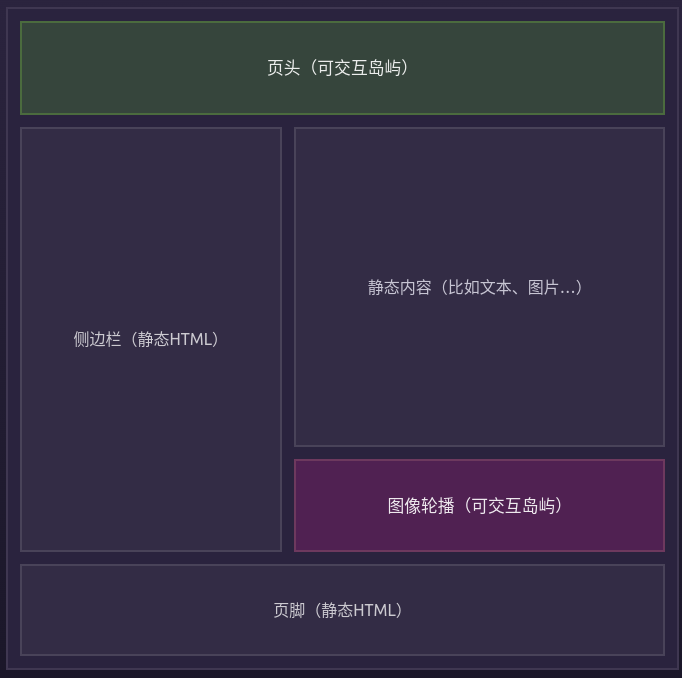
Look at the picture: Astro only renders the parts that change, while unchanged parts stay as they are. The relationship between modules is like islands, and the islands do not interfere with one another. According to Astro’s official explanation, this design can improve site performance.
My blog is still too small to clearly feel a performance difference compared with other front-end frameworks or generators, but the island concept is still interesting.
For more details, see the official documentation.
What I Used from Astro
Source code of this blog: astro_blog
Astro considers many things, but I use only a small part of it as needed. The documentation is good.
Markdown
Astro can render Markdown into web pages and also supports syntax highlighting. It has built-in support for Shiki and Prism. This blog uses Prism syntax highlighting with the nord theme.
There are many other features, such as drafts, MDX rendering, and content collections for multilingual content or joined information. I did not use many of them.
Routing
Astro’s routing is file-based. It generates build links from the file structure in the
src/pagesdirectory. When a file is added tosrc/pages, a route is automatically generated based on the file name. — official docs
The tag pages in my blog use dynamic routing.
Code
export async function getStaticPaths() {
  const projectPosts = await Astro.glob('../posts/*.md')
  const cleanCxxPosts = await Astro.glob('../posts/clean_cxx/*.md')
  const cxxCreationalPatternsPosts = await Astro.glob('../posts/cxx_design_patterns/creational_patterns/*.md')
  const cxxStructuralPatternsPosts = await Astro.glob('../posts/cxx_design_patterns/structural_patterns/*.md')
  const cxxBehavioralPatternsPosts = await Astro.glob('../posts/cxx_design_patterns/behavioral_patterns/*.md')
  const projectTags = [...new Set(projectPosts.map((post) => post.frontmatter.tags).flat())]
  const cleanCxxTags = [...new Set(cleanCxxPosts.map((post) => post.frontmatter.tags).flat())]
  const cxxCreationalPatternsTags = [...new Set(cxxCreationalPatternsPosts.map((post) => post.frontmatter.tags).flat())]
  const cxxStructuralPatternsTags = [...new Set(cxxStructuralPatternsPosts.map((post) => post.frontmatter.tags).flat())]
  const cxxBehavioralPatternsTags = [...new Set(cxxBehavioralPatternsPosts.map((post) => post.frontmatter.tags).flat())]
  const uniqueTags = [
    ...new Set([
      ...projectTags,
      ...cleanCxxTags,
      ...cxxCreationalPatternsTags,
      ...cxxStructuralPatternsTags,
      ...cxxBehavioralPatternsTags,
    ]),
  ]
  const allPosts = projectPosts
    .concat(cleanCxxPosts)
    .concat(cxxCreationalPatternsPosts)
    .concat(cxxStructuralPatternsPosts)
    .concat(cxxBehavioralPatternsPosts)

  return uniqueTags.map((tag) => {
    const filteredPosts = allPosts.filter((post) => post.frontmatter.tags.includes(tag))
    return {
      params: { tag },
      props: { posts: filteredPosts },
    }
  })
}

const { tag } = Astro.params
const { posts } = Astro.props
Here, tag is passed in from outside. After being processed by getStaticPaths, the corresponding posts for that tag are obtained and displayed.
With very little effort, I get a tag page and detail pages for each tag.
.astro
Astro has its own file type, .astro, where HTML, CSS, and JS can be written in a way that feels somewhat similar to .vue.
Astro also supports integration with other frameworks such as React, Vue, and Svelte, so components from those frameworks can be used inside .astro files.
But I did not use that. For this blog, the three front-end basics - HTML, CSS, and vanilla JS - are enough.
End
Astro is content-centered, and it is convenient for building a blog. Its official tutorial is also about making a blog.
At first, I wanted to write an article praising this technology. But after carefully code reviewing my own code and reading the official documentation more seriously, I realized I had only used a small part of Astro. It is hard to objectively evaluate all the pros and cons of the technology.
Still, based on my usage so far, the experience has been good and I would recommend it.